The best AI marketing tools for small business in 2026 can help smaller teams create content, manage leads, automate campaigns, improve search visibility, and compete more effectively without building a large marketing department.
AI tools can now help create content, design marketing assets, manage leads, automate email campaigns, schedule social posts, research competitors, improve search visibility, and connect different business applications.
The challenge is no longer finding an AI tool.
The challenge is choosing the right tools without paying for several platforms that solve the same problem.
AI marketing tools for small business. This guide compares seven of the best AI marketing tools for small businesses in 2026 and explains what each one is best suited for.
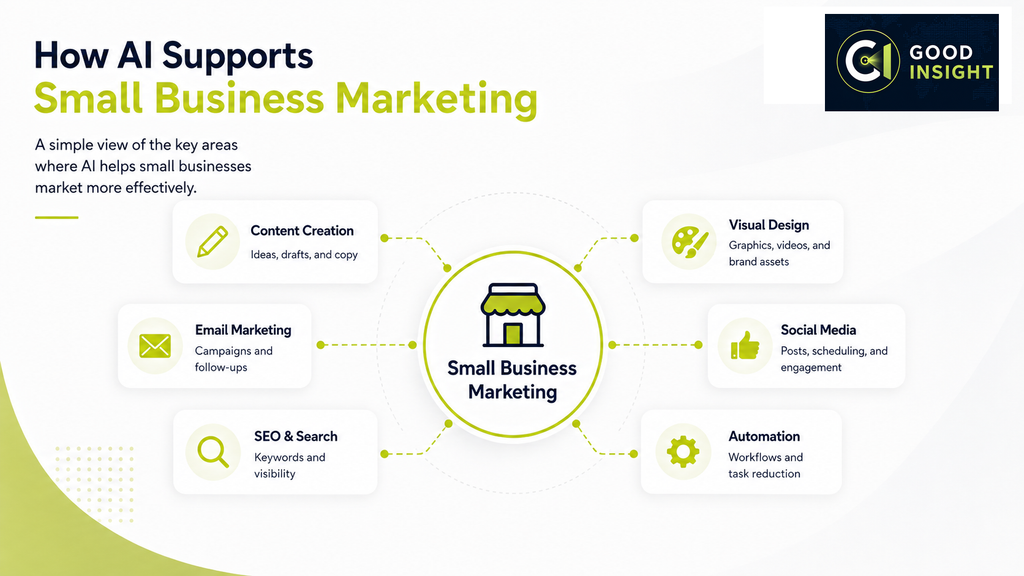
Table of Contents
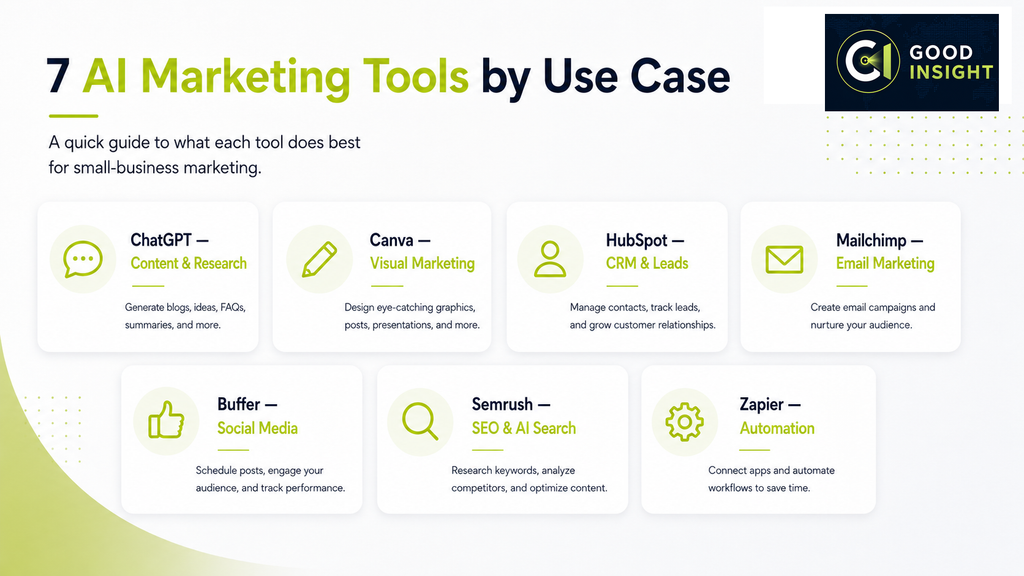
Quick Comparison: Best AI Marketing Tools for Small Business
| Tool | Best For | Free Option | Paid Pricing |
|---|---|---|---|
| ChatGPT | Content, research and marketing ideas | Yes | Plus: $20/month |
| Canva | Visual content and marketing design | Yes | Paid plans available |
| HubSpot | CRM, leads and marketing automation | Yes | Starter from $7/month/seat when billed annually |
| Mailchimp | Email marketing | Yes | Standard from $20/month after trial |
| Buffer | Social media management | Yes | Paid plans priced by social channel |
| Semrush | SEO and AI search intelligence | Trial available | SEO from $117.33/month when billed annually |
| Zapier | Marketing workflow automation | Yes | Paid plans available |
Pricing was checked against official provider information in August 2026. Prices, promotions, usage limits, and billing terms can change.
1. ChatGPT — Best Overall AI Marketing Assistant
Best for:
Content creation, research, brainstorming, campaign planning, customer communication, and marketing analysis.
ChatGPT is one of the most versatile AI tools available to a small business because it can support many different marketing tasks instead of focusing on only one function.
Businesses can use ChatGPT to:
- Generate blog post ideas
- Draft emails and newsletters
- Write social media posts
- Develop advertising concepts
- Create customer personas
- Summarize research
- Rewrite marketing copy
- Generate product descriptions
- Build campaign plans
- Analyze uploaded documents and data
For small businesses without dedicated copywriters, researchers, or marketing strategists, this flexibility can save substantial time.
Why we recommend it
ChatGPT is especially useful as a starting point because one subscription can support multiple parts of the marketing workflow.
It does not replace dedicated CRM, SEO, email, or design software, but it can help businesses produce ideas and content faster across all of those areas.
Pricing
ChatGPT offers a free plan.
ChatGPT Plus currently costs $20 per month and provides broader access to models and tools than the free version.
Pros
- Extremely versatile
- Useful across many marketing functions
- Easy to start using
- Strong writing and research capabilities
- Can reduce repetitive marketing work
Cons
- Outputs still require human review
- It does not replace specialist marketing platforms
- Results depend heavily on the quality of instructions and source information
Best choice for:
Small businesses looking for one AI assistant that can support many different marketing activities.
2. Canva — Best for AI-Powered Visual Marketing
Best for:
Social media graphics, advertising creatives, presentations, videos, marketing materials, and brand content.
Canva has developed from a simple graphic design tool into a broader visual content platform with AI-assisted features, templates, brand tools, collaboration, and publishing capabilities.
Small businesses can use Canva to create:
- Instagram and Facebook posts
- YouTube thumbnails
- Advertising graphics
- Presentations
- Flyers and brochures
- Short-form videos
- Website graphics
- Product promotions
Canva also offers AI-assisted tools for writing, resizing, translating, editing, and generating visual content.
Why we recommend it
Most small businesses need visual content regularly but cannot justify hiring a designer for every social post, presentation, advertisement, or promotion.
Canva makes these everyday design tasks much easier to handle internally.
Pricing
Canva provides a free plan as well as paid Pro and Business plans.
Because pricing can vary by country, billing cycle, and plan type, businesses should check Canva’s current pricing page before subscribing.
Pros
- Very easy to use
- Large template and media library
- Strong combination of AI and design tools
- Useful for digital and printed marketing
- Can reduce dependence on external designers
Cons
- Advanced original design still requires creative judgment
- Premium features require a paid plan
- AI-generated designs still need brand consistency checks
Best choice for:
Small businesses producing large amounts of visual marketing content.
3. HubSpot — Best for CRM and Lead Management
Best for:
Customer relationship management, lead generation, email marketing, sales pipelines, forms, and marketing automation.
As a business generates more leads, marketing becomes less about creating individual campaigns and more about organizing prospects, customer communication, email activity, forms, and sales follow-up.
HubSpot combines these functions inside one customer platform.
Small businesses can use HubSpot for:
- CRM
- Contact management
- Lead capture forms
- Marketing emails
- Live chat
- Campaign automation
- Customer segmentation
- Reporting
- AI-assisted marketing capabilities
Why we recommend it
HubSpot is one of the strongest options for businesses moving from basic marketing into a more structured lead-management system.
Its free tools also make it possible to start small before moving into paid plans.
Pricing
HubSpot currently offers a Free plan at $0 per month for up to two users.
Marketing Hub Starter starts at $7 per seat per month when billed annually on HubSpot’s pricing page.
Marketing Hub Professional starts at $800 per month when billed annually, although HubSpot also displays different prices on some product pages depending on billing terms and current promotions.
Because HubSpot pricing varies considerably by tier, marketing contacts, billing period, and promotional offers, businesses should confirm the final price before purchasing.
Pros
- CRM and marketing in one platform
- Useful free starting point
- Can scale with business growth
- Strong lead and customer management capabilities
Cons
- Advanced plans become expensive
- Higher tiers may be excessive for very small businesses
- More complicated than simple standalone tools
Best choice for:
Businesses that need structured lead, customer, and marketing management.
4. Mailchimp — Best for Email Marketing
Best for:
Newsletters, promotional emails, customer segmentation, automated email campaigns, and audience management.
Email remains one of the most important direct marketing channels for many small businesses.
Mailchimp combines email creation, audience management, automation, forms, analytics, and generative AI features in one platform.
Businesses can use Mailchimp to:
- Build newsletters
- Create promotional campaigns
- Segment customers
- Automate follow-up emails
- Create signup forms
- Test different email content
- Monitor campaign performance
Why we recommend it
Mailchimp remains one of the most accessible options for businesses that want to build a structured email marketing program without adopting a full CRM platform.
Pricing
Mailchimp offers a basic free option for smaller contact lists.
Its Standard plan currently includes a 14-day free trial and then starts at $20 per month, with actual pricing depending on contact volume and plan configuration.
Pros
- Established email marketing platform
- Easy campaign creation
- Automation and segmentation tools
- Suitable for growing customer databases
Cons
- Costs increase as contact lists grow
- Some advanced features require higher plans
- Businesses needing a full CRM may prefer a broader platform such as HubSpot
Best choice for:
Small businesses where email is an important sales and customer-retention channel.
5. Buffer — Best for Social Media Management
Best for:
Planning, scheduling, publishing, and managing social media content.
Managing several social networks manually can consume a large amount of time.
Buffer gives small businesses one place to organize and publish content across multiple social platforms.
Its current plans include publishing and scheduling tools, a content calendar, idea management, and an AI Assistant.
Businesses can use Buffer to:
- Schedule social posts
- Maintain a content calendar
- Repurpose existing content
- Manage multiple channels
- Organize content ideas
- Review performance data
- Use AI assistance for social content
Why we recommend it
Buffer is useful for small businesses that already create content but struggle to publish consistently across multiple channels.
Pricing
Buffer offers a free plan and paid Essentials and Team plans.
Paid pricing is structured primarily around the number of social channels connected, so the total cost depends on how many accounts a business manages. Buffer also offers a 14-day trial of paid features.
Pros
- Easy to use
- Free starting option
- AI Assistant available
- Supports many social media workflows
- Pricing can work well for businesses managing only a few channels
Cons
- Costs rise as more channels are added
- Primarily a social media tool rather than a complete marketing platform
- Some team features require higher plans
Best choice for:
Businesses that need to publish consistently across several social platforms.
6. Semrush — Best for SEO and AI Search Intelligence
Best for:
Keyword research, SEO, competitor analysis, website audits, rankings, and AI search visibility.
Semrush is more accurately described as an SEO and AI search intelligence platform than a general-purpose AI marketing tool.
It helps businesses understand how customers discover them through traditional search engines and increasingly through AI-powered search platforms.
Semrush can be used for:
- Keyword research
- Competitor analysis
- Website audits
- Position tracking
- SEO opportunity discovery
- Backlink research
- AI search visibility monitoring
- Prompt tracking
- Competitor visibility analysis
Current Semrush plans include tools for monitoring visibility across environments such as Google Search, ChatGPT, Gemini, and Perplexity.
Why we recommend it
For businesses relying heavily on organic traffic, Semrush provides a level of search intelligence that general AI assistants cannot replace.
Pricing
Semrush’s SEO plan currently starts at $117.33 per month when billed annually, compared with $139 on monthly billing.
Its higher SEO + AI Search plans include expanded AI visibility and prompt-tracking capabilities.
Pros
- Powerful SEO research
- Strong competitor intelligence
- Website auditing tools
- Traditional and AI search visibility tracking
- Valuable for content-driven businesses
Cons
- Expensive compared with simpler small-business tools
- Many features may be unnecessary for beginners
- Requires time to learn
Best choice for:
Businesses that rely heavily on Google, content marketing, SEO, and AI search visibility.
7. Zapier — Best for Marketing Workflow Automation
Best for:
Connecting business applications and automating repetitive marketing workflows.
Small businesses often use several different platforms for forms, email, CRM, project management, social media, and customer communication.
The problem is that information frequently needs to be transferred manually between those systems.
Zapier connects these applications and automates those repetitive processes.
For example, when a customer submits a website form, Zapier can automatically:
- Add the contact to a CRM.
- Add the email address to a mailing list.
- Create a sales task.
- Send a notification to the team.
That workflow can happen without manual data entry.
Zapier now combines traditional workflow automation with Tables, Forms, MCP capabilities, and AI-based automation.
Why we recommend it
Zapier is especially valuable when a business already uses several different software tools and employees spend time copying information between them.
Pricing
Zapier’s Free plan currently includes 100 tasks per month.
Paid plans increase task capacity and provide access to more advanced automation features. Zapier has also introduced model-based task usage for AI-powered steps, meaning AI automation can consume different numbers of tasks depending on the model tier selected.
Pros
- Connects many business applications
- Reduces repetitive manual work
- Does not require traditional programming
- Useful across marketing and business operations
Cons
- Complex workflows require planning
- Costs can increase with automation volume
- AI workflows may consume tasks at different rates
- Zapier works alongside other tools rather than replacing them
Best choice for:
Small businesses that use several apps and want to automate repetitive marketing and operational processes.
How to Choose AI Marketing Tools for Small Business
AI marketing tools for small business.
The right tool depends on the marketing problem your business needs to solve first.
If you need help with writing, research, campaign planning, and marketing ideas, start with ChatGPT.
If you regularly create graphics, videos, presentations, and social content, consider Canva.
If your biggest challenge is managing leads, prospects, and customers, HubSpot is the stronger option.
If email plays a major role in sales and customer retention, Mailchimp deserves consideration.
For businesses managing several social networks, Buffer can reduce the time required to plan and publish content.
If organic search is an important customer acquisition channel, Semrush provides much deeper SEO and AI search intelligence.
And if employees spend too much time moving data between applications, Zapier can automate those workflows.
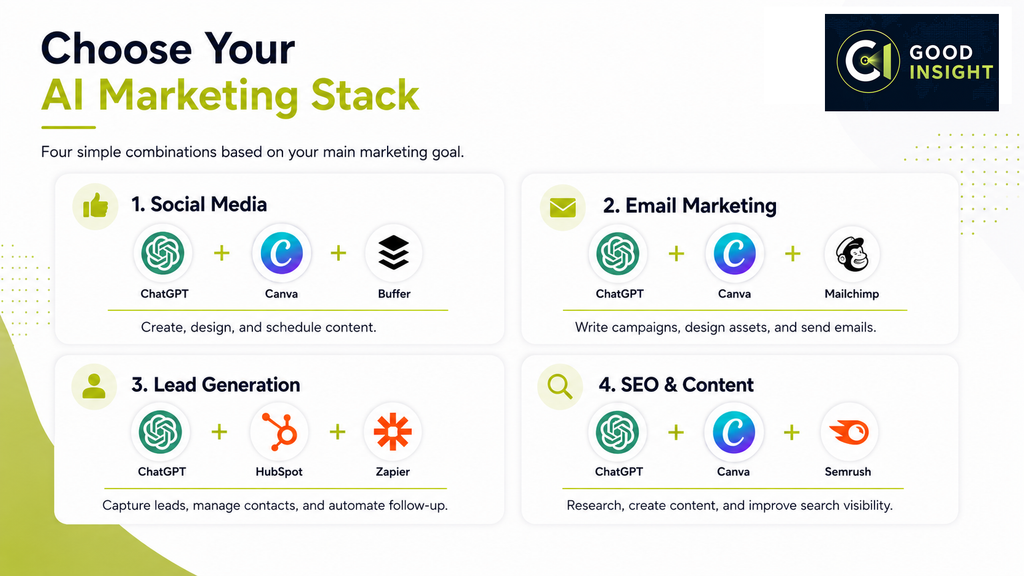
Best AI Marketing Stacks for Small Businesses
Most small businesses do not need all seven platforms.
A better approach is to build a small software stack around the marketing channel that matters most.
For Social Media Marketing
ChatGPT + Canva + Buffer
ChatGPT helps generate ideas and copy, Canva creates the visual content, and Buffer handles scheduling and publishing.
For Email Marketing
ChatGPT + Canva + Mailchimp
This combination works well for newsletters, promotional campaigns, visual email assets, and customer communication.
For Lead Generation and Sales
ChatGPT + HubSpot + Zapier
ChatGPT supports content and communication, HubSpot manages leads and customers, and Zapier connects the surrounding workflow.
For SEO and Content Marketing
ChatGPT + Canva + Semrush
ChatGPT supports research and drafting, Canva creates supporting visual assets, and Semrush provides keyword, competitor, SEO, and AI search intelligence.
Final Verdict
AI marketing tools for small business. AI marketing software is making capabilities that once required specialist employees or outside agencies accessible to much smaller businesses.
But the goal should not be to collect as many AI tools as possible.
For most small businesses in 2026, ChatGPT is the strongest general-purpose starting point because it can support content creation, research, planning, and communication across many marketing activities.
Canva is a strong companion for visual content.
From there, the best investment depends on the business model:
- HubSpot for CRM and lead management
- Mailchimp for email marketing
- Buffer for social media management
- Semrush for SEO and AI search intelligence
- Zapier for workflow automation
Start with the marketing task that consumes the most time or creates the biggest bottleneck.
Then add additional software only when it solves a clear business problem.