The best AI video generators for small business in 2026 can help smaller teams create marketing, training, product, and social videos faster without building a traditional production team.
AI video generators can now help businesses produce product videos, social media clips, explainer videos, training content, ads, presentations, and multilingual videos much faster than traditional production workflows.
But the tools are very different.
Some focus on cinematic generative video. Others are designed around AI avatars, script-to-video workflows, stock media, or fast business content production.
This guide compares seven of the best AI video generators for small business in 2026 and explains which type of business each platform is best suited for.
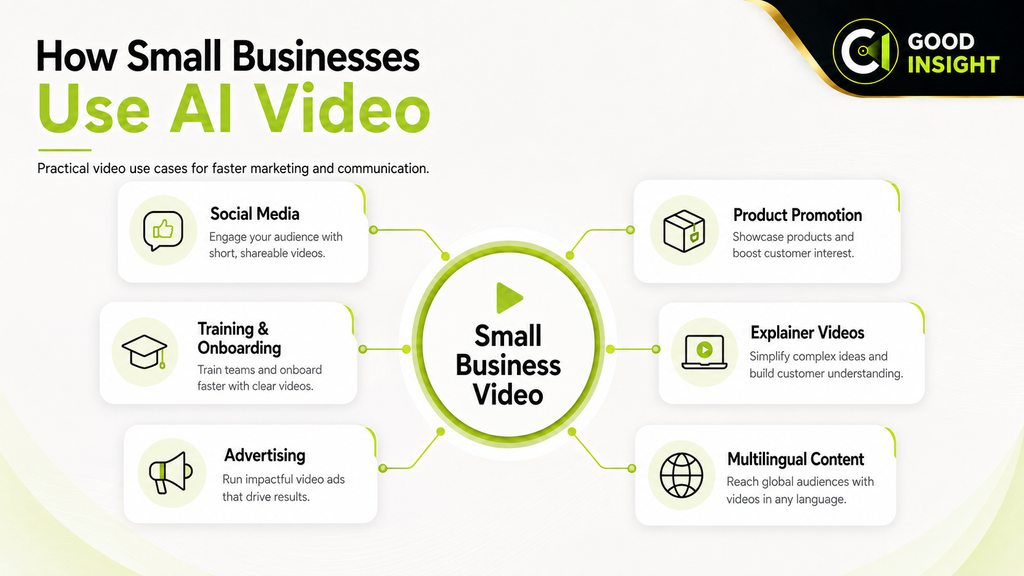
Table of Contents
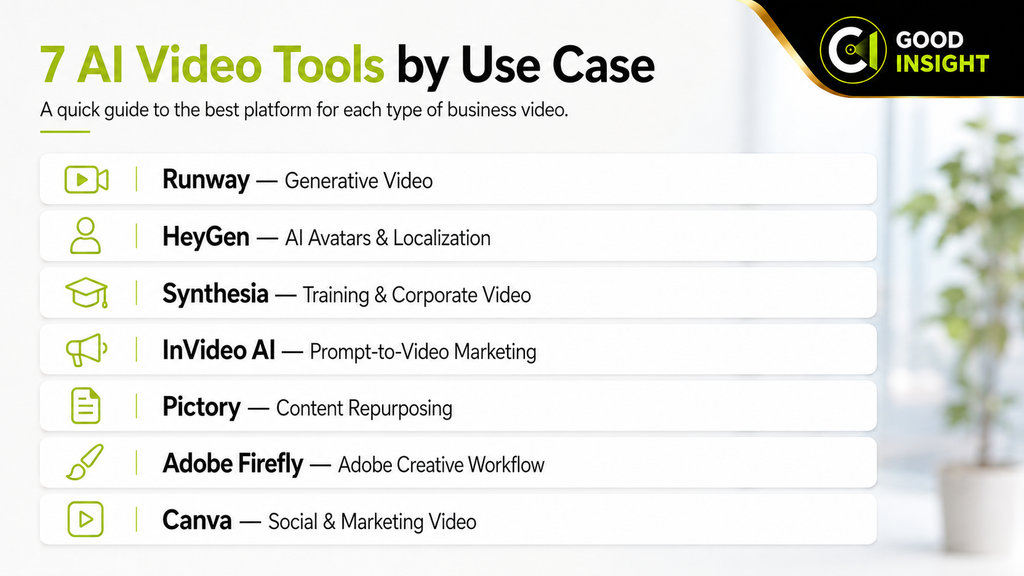
Quick Comparison: Best AI Video Generators for Small Business
| Tool | Best For | Free Option | Paid Pricing |
|---|---|---|---|
| Runway | Generative video and creative production | Yes | Standard: $15/month on monthly billing |
| HeyGen | AI avatars and multilingual business videos | Yes | Creator: $29/month |
| Synthesia | Training and corporate avatar videos | Yes | Starter: $29/month |
| InVideo AI | Prompt-to-video and marketing content | Yes | Generative: $170/month billed annually |
| Pictory | Turning scripts and existing content into video | 14-day trial | Starter: $19/month billed annually |
| Adobe Firefly | Generative video inside Adobe workflows | Yes | Standard: ₩11,000/month regular annual-plan price in Korea |
| Canva | Fast visual and social video creation | Yes | Pro and Business plans available |
Pricing, credits, and plan structures were checked against official provider information available in August 2026. Prices, promotions, billing terms, and usage limits can change.
1. Runway — Best for Generative Video and Creative Production
Best for:
AI-generated scenes, product visuals, advertising concepts, cinematic clips, and creative video production.
Runway is one of the more advanced platforms for businesses that want to generate original video rather than simply assemble templates and stock footage.
It can be used for:
- Text-to-video
- Image-to-video
- Video transformation
- Product advertising concepts
- Visual effects
- Social media clips
- Creative campaign assets
- Short cinematic sequences
Why we recommend it
Runway is especially valuable when a business needs visual material that would otherwise require filming, animation, or visual-effects production.
Its strength is creative generation rather than traditional presentation-style business video.
Pricing
Runway’s Free plan includes a one-time allocation of 125 credits.
The Standard plan includes 625 credits per month. Runway lists Standard at $15 per user per month on monthly billing, or $144 per year per editor on annual billing.
Pro includes 2,250 monthly credits, while Max includes 9,500 monthly credits and allows up to one month of unused credits to roll over.
Pros
- Powerful generative video capabilities
- Good for original visual concepts
- Access to multiple AI models
- Useful for advertising and creative campaigns
- Supports image, video, and audio workflows
Cons
- Credits can be consumed quickly
- Consistent outputs may require experimentation
- Less suitable for simple presenter-style corporate videos
Best choice for:
Small businesses that want original AI-generated visual content rather than template-based video.
2. HeyGen — Best for AI Avatars and Multilingual Business Videos
Best for:
AI presenters, product explainers, sales videos, training content, and multilingual localization.
HeyGen focuses heavily on AI avatars and presenter-based video.
A business can enter a script, choose an avatar, add a voice, and generate presenter-style video without repeatedly filming a real person.
Businesses can use HeyGen for:
- Product explainers
- Sales presentations
- Training videos
- Onboarding
- Social media content
- Multilingual marketing
- Video localization
- AI spokesperson videos
Why we recommend it
HeyGen is particularly useful for small businesses that need people-centered video content but do not want to repeatedly organize cameras, studios, presenters, or voice actors.
Its multilingual capabilities also make it attractive to businesses operating across different countries.
Pricing
HeyGen Free currently allows 3 videos per month, with videos up to 1 minute.
Creator costs $29 per month, or $24 per month when billed annually. It includes 600 credits, videos up to 30 minutes, 1080p export, watermark removal, voice cloning, and support for more than 175 languages and dialects.
Pro starts at $49 per month and supports 4K export.
Pros
- Strong AI avatar capabilities
- Easy presenter-video creation
- Broad multilingual support
- Voice cloning
- Useful for localization
Cons
- Avatar content can feel repetitive if overused
- Higher-quality production consumes credits
- Not the strongest choice for cinematic generative scenes
Best choice for:
Businesses that need presenter-style, multilingual, or spokesperson videos at scale.
3. Synthesia — Best for Training and Corporate Video
Best for:
Employee training, onboarding, internal communication, tutorials, and structured business presentations.
Synthesia is designed more around professional business communication than entertainment-style video generation.
Businesses can use it to create:
- Training modules
- Onboarding content
- Software tutorials
- Internal announcements
- Compliance videos
- Product education
- Corporate presentations
Why we recommend it
Synthesia is particularly useful when a company repeatedly needs to convert written material into structured presenter-based video.
For training and instructional content, this can reduce the time and cost associated with traditional recording.
Pricing
Synthesia Basic is free and includes 1,200 credits per month, usable for up to approximately 10 minutes of video per month.
Starter costs $29 per month on monthly billing.
Creator costs $89 per month, while Enterprise uses customized pricing.
Pros
- Strong business and training focus
- Professional avatar presentation
- Useful for repeatable educational content
- Supports dubbing and multiple languages
- Enterprise-oriented features available
Cons
- Less focused on cinematic creativity
- Higher usage levels become more expensive
- Presenter format is not suitable for every marketing use case
Best choice for:
Businesses that need training, onboarding, instructional, or corporate communication videos.
4. InVideo AI — Best for Prompt-to-Video Marketing Content
Best for:
YouTube videos, social media marketing, advertising content, stock-based video production, and fast prompt-to-video creation.
InVideo AI is designed to turn written instructions into complete videos.
Its current platform combines AI models, workflows, avatars, voices, stock media, and editing capabilities.
Businesses can use it for:
- Social media videos
- YouTube content
- Advertising
- Product promotion
- Explainer videos
- AI-generated scenes
- Stock-based marketing videos
- Voiceover content
Why we recommend it
InVideo AI is useful for small businesses that want a more automated end-to-end workflow.
Instead of separately sourcing footage, generating voiceovers, finding stock assets, and editing everything manually, users can begin with a prompt and let the platform handle much of the assembly process.
Pricing
InVideo AI offers multiple paid tiers, and pricing varies by plan, credit allowance, model access, and billing cycle.
The Generative plan is currently listed at $170 per month when billed annually, while the Elite plan is $900 per month when billed annually.
Lower-priced paid tiers are also available, but their pricing and included credits can change more frequently. Businesses should confirm the current official pricing page before subscribing.
Credit consumption also varies depending on the model and workflow used.
Pros
- End-to-end AI video workflow
- Access to multiple generative models
- Stock media integration
- Useful for social and YouTube content
- Prompt-driven production
Cons
- Credit usage can be difficult to predict
- Higher tiers become expensive
- Generated videos still require human review and editing
Best choice for:
Small businesses that want a fast prompt-to-video workflow for marketing and social content.
5. Pictory — Best for Turning Existing Content Into Video
Best for:
Blog-to-video, script-to-video, content repurposing, video summaries, and stock-based business videos.
Pictory is especially useful for businesses that already have written content and want to convert it into video.
It can transform scripts or existing material into videos using stock media, AI voices, captions, and automated editing.
Typical uses include:
- Blog posts converted into videos
- Script-to-video
- Social media clips
- Video summaries
- Training content
- Recorded-video highlights
- Voiceover-based marketing videos
Why we recommend it
Pictory solves a common small-business problem: businesses often already have articles, presentations, or scripts but lack the time to create video versions.
That makes it particularly useful for content repurposing.
Pricing
Pictory offers a 14-day free trial.
The Starter plan is currently $19 per month when billed annually, or $25 per month on monthly billing.
Professional and Team plans are also available for businesses that need more video minutes, users, storage, and advanced features.
Pros
- Strong script-to-video workflow
- Useful for content repurposing
- Stock-footage integration
- AI voice support
- Automatic captioning
Cons
- Less suitable for highly original cinematic video
- Stock-heavy outputs can look generic
- Generative AI usage depends on credits
Best choice for:
Businesses that want to turn existing written content into video efficiently.
6. Adobe Firefly — Best for Businesses Already Using Adobe
Best for:
Generative video, image-to-video, creative production, and integration with professional Adobe workflows.
Adobe Firefly has expanded beyond image generation into video, audio, and broader generative creative tools.
It is especially relevant to businesses already using Adobe products for design, photography, or video production.
Potential uses include:
- Generative video clips
- Image-to-video
- Marketing visuals
- Creative experimentation
- Background and asset generation
- Adobe-based production workflows
Why we recommend it
Firefly is attractive to businesses already working inside Adobe because AI-generated assets can fit directly into a broader professional creative ecosystem.
Pricing
On Adobe’s Korean pricing page, Firefly Standard has a regular annual-plan price of ₩11,000 per month, while Firefly Pro is ₩22,000 per month.
Standard includes 2,000 monthly generative credits, while Pro includes 4,000.
Adobe may also run introductory or limited-time promotions, so businesses should verify the final checkout price before subscribing.
Pros
- Strong Adobe ecosystem integration
- Supports video and other generative media
- Useful for professional creative workflows
- Suitable for businesses already using Adobe software
Cons
- Credit consumption varies by feature
- Best value mainly for existing Adobe users
- Pricing and promotions vary by country
Best choice for:
Businesses already using Adobe that want AI video generation integrated into a professional creative workflow.
7. Canva — Best for Fast Social and Marketing Video Creation
Best for:
Social media video, presentations, short ads, simple promotional videos, and branded content.
Canva is not primarily a cinematic AI video platform.
Its strength is making everyday business content easy to create.
Small businesses can combine templates, stock assets, animation, brand tools, AI-assisted creation, and video editing inside one workspace.
Typical uses include:
- Instagram and Facebook videos
- YouTube Shorts
- Promotional clips
- Presentations
- Product announcements
- Simple advertisements
- Branded social content
Why we recommend it
Canva is especially useful for businesses that need a high volume of straightforward marketing content rather than complex generative filmmaking.
Its biggest advantage is accessibility.
Pricing
Canva offers Free, Pro, Business, and organization-level options.
Pricing varies by market, billing cycle, and account type, so businesses should confirm current local pricing before subscribing.
Pros
- Very easy to use
- Large template and media library
- Strong branding tools
- Good for social media
- Combines graphics and video
Cons
- Less advanced generative video than specialized platforms such as Runway
- Not ideal for sophisticated cinematic production
- Template-heavy output can look similar to other Canva-created content
Best choice for:
Businesses that need fast, simple, branded marketing videos without a steep learning curve.
How to Choose an AI Video Generator for Small Business
The best AI video generator for small business depends on what your company actually needs to produce.
If you need original generative scenes and creative advertising visuals, consider Runway.
If you want AI presenters or multilingual spokesperson videos, HeyGen is one of the strongest options.
For training, onboarding, and corporate communication, Synthesia is more specialized.
If you want to create complete marketing videos from prompts, InVideo AI offers a broad automated workflow.
If you already have blog posts, scripts, webinars, or other written material that needs to be repurposed, Pictory is a practical choice.
Businesses already invested in Adobe may prefer Firefly.
And for simple social media and branded promotional videos, Canva is often the easiest place to start.
Best AI Video Stacks for Small Businesses
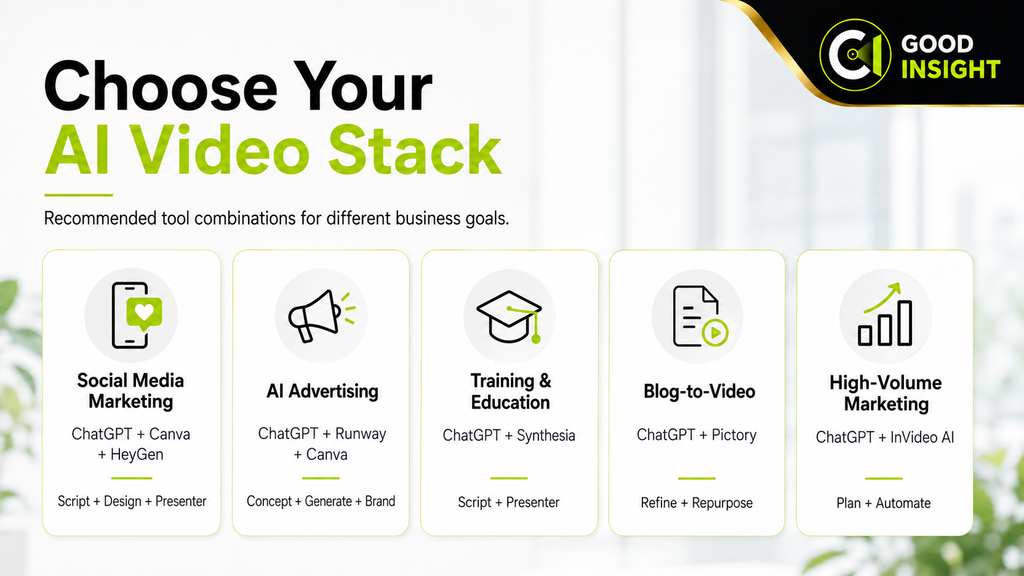
Most small businesses do not need every platform.
A better approach is to choose a combination based on the type of video you produce.
For Social Media Marketing
ChatGPT + Canva + HeyGen
ChatGPT helps create scripts and ideas, Canva handles graphics and editing, and HeyGen can provide presenter or avatar content.
For AI Advertising
ChatGPT + Runway + Canva
ChatGPT develops concepts and scripts, Runway creates original AI footage, and Canva helps assemble branded marketing assets.
For Training and Education
ChatGPT + Synthesia
ChatGPT helps structure scripts and instructional material, while Synthesia converts that material into presenter-based videos.
For Blog-to-Video Content
ChatGPT + Pictory
ChatGPT can refine scripts or summarize existing articles, while Pictory converts the material into video.
For High-Volume Marketing Content
ChatGPT + InVideo AI
ChatGPT helps plan the content and develop scripts, while InVideo AI handles much of the video generation and assembly workflow.
Final Verdict
AI video tools are making video production accessible to small businesses that previously lacked the budget, staff, or technical expertise to produce content consistently.
But the best platform depends heavily on the type of video being created.
For original generative video, Runway is one of the strongest creative choices.
For avatar-based business communication, HeyGen and Synthesia are more appropriate.
For rapid prompt-driven marketing production, InVideo AI provides a broad automated workflow.
For repurposing existing written content, Pictory is particularly practical.
Adobe users should consider Firefly, while Canva remains one of the easiest options for everyday social and promotional content.
The best AI video generators for small business are not necessarily the most technically advanced tools.
They are the platforms that allow a business to create useful video content consistently, at a cost and level of complexity that fit its actual marketing needs.
For more AI content tools, see our guide to the Best AI Writing Tools for Small Business in 2026.